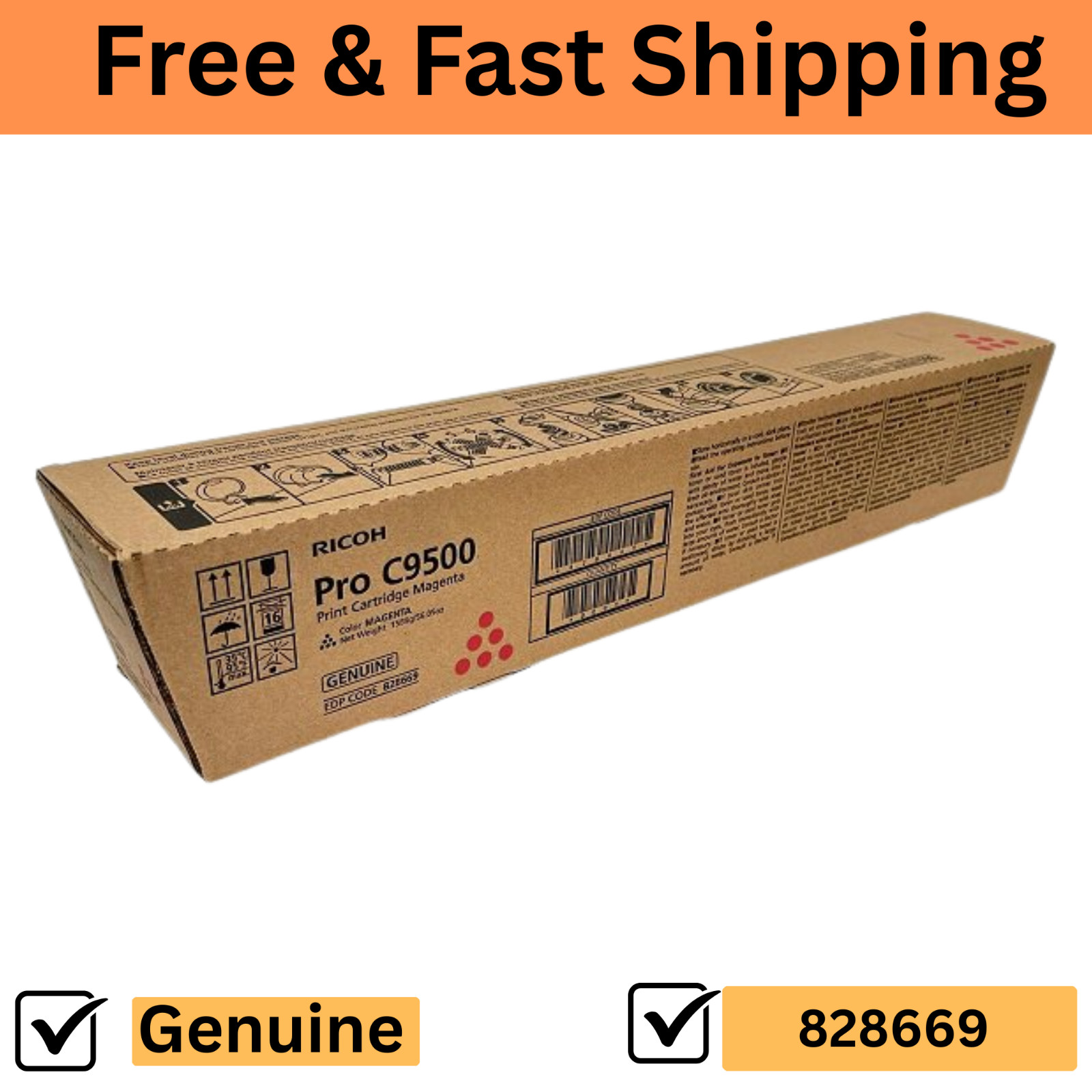

Photos from current listings. Actual item, color, and included accessories may vary.
Ricoh Pro C9500 Buying Guide
The Ricoh Pro C9500 is a production-class digital color press built for high-volume commercial printing, not office use. Its defining trade-off is between the extreme durability and per-sheet economy of a true production engine and the massive floor-space, power, and service requirements that come with it. Buy it only if you run sustained monthly volumes that justify a production press; for anything under a few thousand sheets per month, a light-production or office color laser is the correct choice.
Key takeaways
- Production-class laser engine rated for heavy monthly duty cycles far beyond office printers, with duplexing up to 300 gsm and banner sheets up to 1,030 mm.
- Toner is supplied in high-capacity cartridges; the observed magenta cartridge (MPN 828669) is shared across Ricoh Pro C9500, Savin Pro C9500, and Lanier Pro C9500 badge-engineered models.
- Genuine OEM toner is formulated for the fuser and developer units of this specific engine; third-party cartridges risk color drift and developer wear on a press of this class.
At a glance
- Category
- Printers & Scanners
- Status
- Listings available
- Last updated
- Nov 28, 2026
Current offers
Highlights
- Production-class laser engine rated for heavy monthly duty cycles far beyond office printers, with duplexing up to 300 gsm and banner sheets up to 1,030 mm.
- Toner is supplied in high-capacity cartridges; the observed magenta cartridge (MPN 828669) is shared across Ricoh Pro C9500, Savin Pro C9500, and Lanier Pro C9500 badge-engineered models.
- Genuine OEM toner is formulated for the fuser and developer units of this specific engine; third-party cartridges risk color drift and developer wear on a press of this class.
- A production finisher stack (stacker, booklet finisher, trimmer, ring binder) is required for finishing; the base engine alone only outputs flat sheets.
Best use cases
- Best fit: commercial print shops and in-plant departments running sustained high-volume color work — pick a configuration with the high-capacity stacker and booklet finisher.
- Best fit: print-on-demand operations needing banner and heavy-stock capability — choose the long-sheet feed option and the vacuum feed paper deck.
- Wrong fit: small offices or home users — skip this entirely and choose a workgroup color laser; the C9500's power draw, floor footprint, and service contract are unjustifiable at low volume.
- Wrong fit: anyone without a dedicated 208–240 V circuit and reinforced floor space — skip the C9500 and choose a 120 V light-production model instead.
Buying tips
- Match toner to the badge-engineered model: Ricoh, Savin, and Lanier Pro C9500 all use the same cartridges, so buy by MPN (e.g., 828669 for magenta) rather than by brand badge.
- Size the press to monthly volume: a production C9500 is justified only when you consistently exceed the duty cycle of light-production machines; below that, a mid-volume color laser costs far less to own.
- Specify the finisher stack at purchase: stacker, booklet finisher, trimmer, and ring binder are separate modules, and retrofitting them later costs more than bundling them.
- Confirm paper-path support before buying: heavy cover stock up to 300 gsm and long banners require the specific vacuum-feed deck and long-sheet option, not the standard drawers.
Specs
| Print Engine | Production laser, color |
|---|---|
| Max Paper Weight | Up to 300 gsm |
| Max Sheet Length | Up to 1,030 mm (banner) |
| Power Requirement | 208-240 V dedicated circuit |
Alternatives to compare
Related searches
What to check before buying
- Measure the installation footprint including the finisher and paper deck, and confirm floor loading capacity for the combined weight of engine plus accessories.
- Verify a dedicated 208–240 V power circuit at the correct amperage; this press will not run on a standard 120 V office outlet.
- Confirm the RIP/controller option (fiery-class external controller or embedded) matches your workflow and file formats before ordering.
- Check that the chosen finisher modules match your output mix — booklet, trim, and ring-bind each require their own module.
FAQ
Data sources: eBay / Amazon listings and product attribute feeds. Updated Nov 28, 2026.
Some links on this page are affiliate links. If you buy after clicking one, we may earn a commission at no extra cost to you. This does not change which products appear here or their order. Affiliate disclosure.