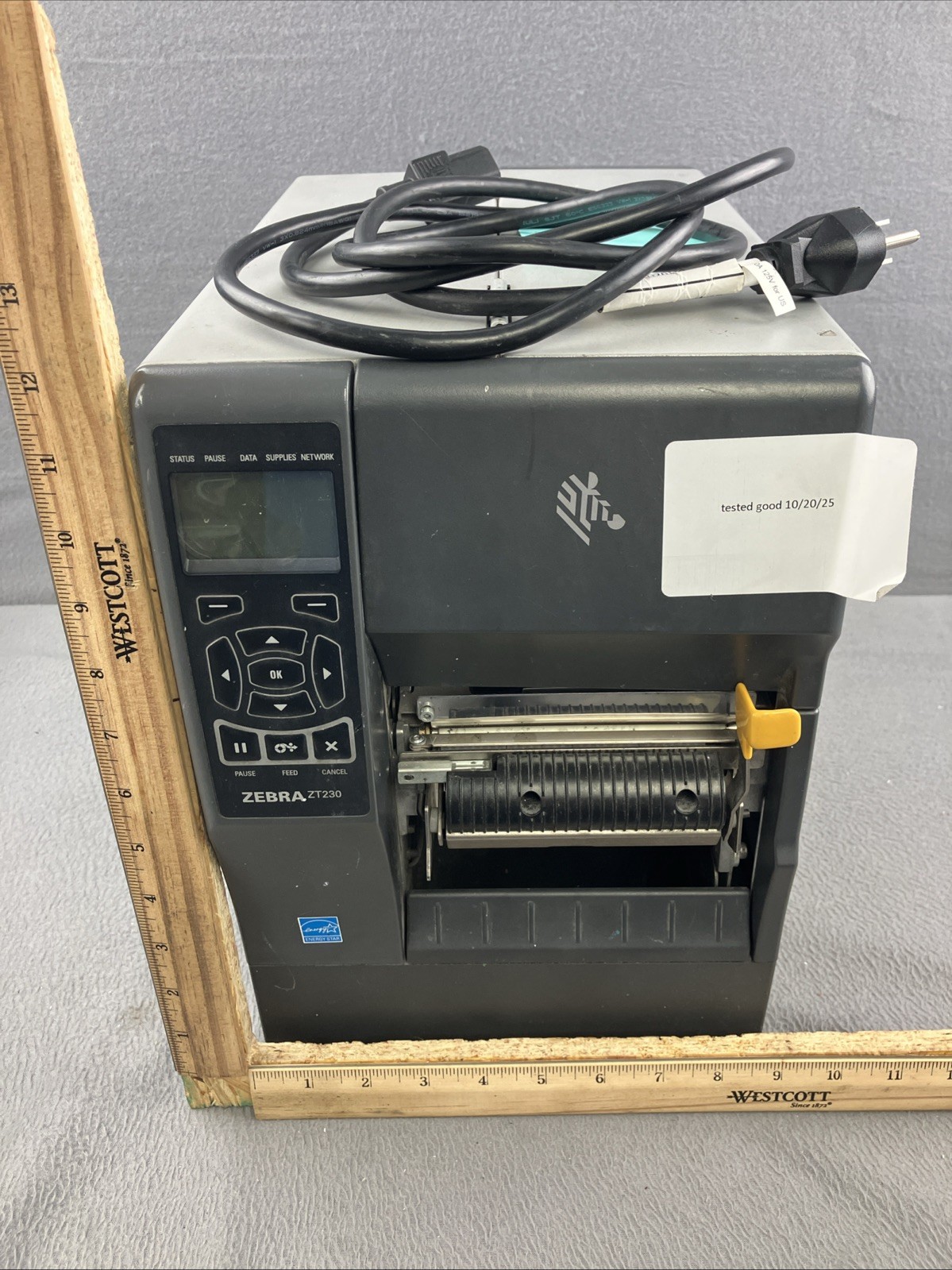

Photos from current listings. Actual item, color, and included accessories may vary.
Zebra Label Printer Buying Guide
Zebra label printers are commercial-grade thermal transfer and direct thermal machines built for barcode, compliance, and asset labeling in warehouses, retail, and healthcare. The core trade-off is print mechanism (thermal transfer needs ribbons for durable, smudge-proof labels; direct thermal needs only media but fades with heat and light) versus resolution and media width, which determine whether you can print scannable small barcodes and fit your widest label. Buy industrial Zebra models (ZT series) when you need 24/7 duty cycles and metal construction; choose desktop GK/GX or ZD series for lighter office or retail use.
Key takeaways
- Zebra industrial ZT series uses a die-cast aluminum frame and metal media cover, rated for high-volume 24/7 duty cycles, while GK/GX desktop models use ABS plastic for light-to-medium use.
- Thermal transfer models (e.g., ZT230) require a ribbon and coated labels for durable prints resistant to heat, abrasion, and chemicals; direct thermal models print on heat-sensitive media only and fade under sunlight or high heat.
- Print resolution tiers are 203 dpi (standard barcodes, large text), 300 dpi (small fonts, 2D codes, compact labels), and 600 dpi (very small, high-density labels); resolution directly limits the smallest readable barcode you can produce.
At a glance
- Category
- Label Makers & Supplies
- Last updated
- Nov 28, 2026
Current offers
Highlights
- Zebra industrial ZT series uses a die-cast aluminum frame and metal media cover, rated for high-volume 24/7 duty cycles, while GK/GX desktop models use ABS plastic for light-to-medium use.
- Thermal transfer models (e.g., ZT230) require a ribbon and coated labels for durable prints resistant to heat, abrasion, and chemicals; direct thermal models print on heat-sensitive media only and fade under sunlight or high heat.
- Print resolution tiers are 203 dpi (standard barcodes, large text), 300 dpi (small fonts, 2D codes, compact labels), and 600 dpi (very small, high-density labels); resolution directly limits the smallest readable barcode you can produce.
- Media width capacity separates classes: desktop GK/GX handle up to 4.25 in wide media, ZD series up to 4.65 in, and ZT industrial models up to 4.5 in with peel/rewind options for automated label dispensing.
Best use cases
- Best fit: Pick a ZT230 or similar ZT industrial model with peel/rewind, Ethernet, and 300 dpi for high-volume warehouse compliance labeling where metal construction and continuous duty matter.
- Wrong fit: Skip industrial ZT models for a home office or small retail counter printing a few dozen labels daily—use a GK/GX or ZD desktop model to avoid unnecessary cost and footprint.
- Best fit: Choose a direct thermal ZD or GX model for shipping labels that are used within weeks (e.g., e-commerce outbound), since no ribbon is needed and labels are consumed quickly.
- Wrong fit: Avoid direct thermal for long-term asset tags, outdoor labels, or anything exposed to heat or sunlight—select a thermal transfer model and pair it with resin or wax-resin ribbon.
Buying tips
- Match resolution to your smallest barcode: 203 dpi for code 128 at 10 mil and larger, 300 dpi for 5–7 mil high-density 2D codes, and 600 dpi only for very small labels under 0.5 in.
- Confirm media core size and max roll diameter: industrial ZT models accept 3 in cores and up to 8 in outer diameter rolls, while desktop models often cap at 5 in outer diameter, affecting how often you reload.
- Choose connectivity by infrastructure: USB is standard, Ethernet is essential for networked multi-user environments, and serial or parallel ports are needed only for legacy host systems.
- Select ribbon type by label durability: wax for paper labels with moderate smudge resistance, wax-resin for coated paper and synthetic labels, and resin for polyester or polypropylene labels needing chemical and heat resistance.
Specs
| Print Method | Thermal transfer vs direct thermal |
|---|---|
| Resolution | 203 / 300 / 600 dpi |
| Max Media Width | 4.25 in desktop / 4.5 in industrial |
| Build & Duty | Metal industrial vs plastic desktop |
Related searches
What to check before buying
- Measure your widest label and verify the printer's maximum print width (typically 4.09–4.25 in for desktop and industrial 4-inch models) before buying.
- Confirm your label roll's core diameter (1 in or 3 in) and outer roll diameter fit the printer's media spindle and enclosure; industrial models accept larger rolls.
- Check interface compatibility with your host device or network: ensure USB, Ethernet, or serial ports match your computer, ERP, or warehouse management system.
- Verify power requirements: Zebra printers ship with region-specific power cords; confirm the voltage (100–240 V) and plug type match your location before ordering.
FAQ
Data sources: eBay / Amazon listings and product attribute feeds. Updated Nov 28, 2026.
Some links on this page are affiliate links. If you buy after clicking one, we may earn a commission at no extra cost to you. This does not change which products appear here or their order. Affiliate disclosure.