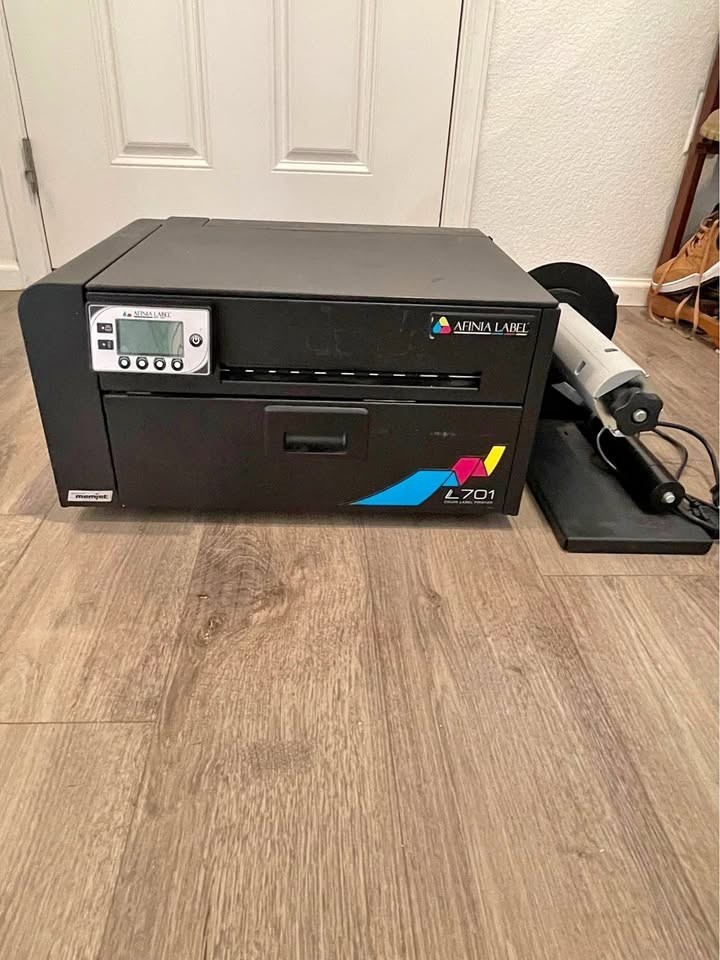

Photos from current listings. Actual item, color, and included accessories may vary.
Inkjet Label Printer Buying Guide
Inkjet label printers use aqueous or pigment ink cartridges to produce full-color labels on demand, trading the durability and speed of thermal transfer for vibrant, photographic-quality output without ribbons. The core trade-off is ink cost and water resistance versus print flexibility: pigment inks resist smudging and fading, while dye inks look brighter but smear on contact with moisture. Buy an inkjet label printer only if you need multi-color graphics, variable data, or short-run custom labels; choose thermal transfer instead for high-volume barcode or chemical-resistant labels.
Key takeaways
- Pigment ink cartridges produce water-fast, fade-resistant labels suitable for outdoor and freezer use; dye inks remain water-soluble and smudge under humidity or handling.
- Commercial inkjet label printers like the Afinia L701 use a fixed printhead with separate ink cartridges, reducing per-label cost versus tri-color cartridge models that waste all colors when one depletes.
- Print resolution of 1200 dpi or higher is required for small text and barcodes; 600 dpi models blur fine type below 6 pt and fail GS1 barcode verification.
At a glance
- Category
- Label Makers & Supplies
- Last updated
- Nov 28, 2026
Current offers
Highlights
- Pigment ink cartridges produce water-fast, fade-resistant labels suitable for outdoor and freezer use; dye inks remain water-soluble and smudge under humidity or handling.
- Commercial inkjet label printers like the Afinia L701 use a fixed printhead with separate ink cartridges, reducing per-label cost versus tri-color cartridge models that waste all colors when one depletes.
- Print resolution of 1200 dpi or higher is required for small text and barcodes; 600 dpi models blur fine type below 6 pt and fail GS1 barcode verification.
- Unwinders and rewinders are separate mechanical modules that maintain web tension; without them, long roll runs skew and jam, so confirm the printer's roll-handling capacity before buying.
Best use cases
- Best fit: short-run product labels, craft beverage labels, and shipping labels with logos or variable data—pick a pigment-ink model with at least 1200 dpi and a built-in unwinder for roll stock.
- Best fit: on-demand color labels for retail or events where graphics change frequently—choose a cartridge-based inkjet over thermal transfer to avoid ribbon waste and plate costs.
- Wrong fit: high-volume warehouse barcode labels or labels exposed to chemicals, solvents, or abrasion—skip inkjet entirely and use thermal transfer with resin ribbon.
- Wrong fit: budgets focused on lowest per-label cost at thousands of units per day—inkjet ink cost per label exceeds thermal transfer and laser toner for monochrome text labels.
Buying tips
- Match ink type to environment: pigment ink for moisture, sunlight, and freezer exposure; dye ink only for indoor, dry-handled labels where color vibrancy matters more than durability.
- Calculate roll capacity: a printer that accepts 8-inch OD rolls needs an external unwinder for rolls beyond that diameter; confirm the spindle diameter (1-inch or 3-inch core) matches your label stock.
- Check print width against label size: a 4-inch printhead cannot produce 6-inch-wide labels without scaling; wide-format label printers start at 8-inch print widths for large packaging.
- Require separate ink cartridges per color (CMYK) rather than a single tri-color cartridge—separate tanks cut waste and lower long-run cost when one color runs out first.
Specs
| Ink Type | Pigment vs Dye vs Latex |
|---|---|
| Print Resolution | 600 dpi / 1200 dpi / 2400 dpi |
| Max Print Width | 2 in / 4 in / 8 in wide |
| Roll Handling | Internal vs Unwinder/Rewinder |
Related searches
What to check before buying
- Measure your label roll core diameter and maximum outside diameter; confirm the printer's spindle and unwinder accept that roll size without an adapter.
- Verify the printer's ink type (aqueous dye, pigment, or latex) is compatible with your label stock coating—uncoated paper may require optimized ink or produce feathering.
- Confirm your computer or network interface: USB, Ethernet, or Wi-Fi; commercial models often lack wireless and require a wired network connection.
- Check voltage and plug standard for your region—commercial inkjet label printers are commonly 110V or 220V fixed, not dual-voltage.
FAQ
Data sources: eBay / Amazon listings and product attribute feeds. Updated Nov 28, 2026.
Some links on this page are affiliate links. If you buy after clicking one, we may earn a commission at no extra cost to you. This does not change which products appear here or their order. Affiliate disclosure.