Choosing among printers scanners can be surprisingly practical: the right pick depends less on a long feature list and more on what kind of everyday work you need to handle. For a home desk, student setup, family workspace, or small home office, the key questions are simple: do you want the lowest listed price, a new-condition unit, Bluetooth support, automatic two-sided printing, or a model described around home office document and photo use?
Here, the choice is between two Canon PIXMA wireless all-in-one inkjet printers. Both sit in a very tight listed price range, both include scanner functionality, and both are described for common home printing needs. The differences are still meaningful: the Canon PIXMA TS6420a Wireless All-In-One Inkjet Printer - Black is the lower-priced option and includes Wireless plus Bluetooth connectivity, while the Canon PIXMA TS3722 Wireless All-In-One Inkjet Printer for Home Office is the new-condition option with a home office focus and single-sided printing only.
Quick take
- Pick the Canon PIXMA TS6420a Wireless All-In-One Inkjet Printer - Black if you want the lowest listed price here, a black all-in-one design, Wireless and Bluetooth connectivity, scanner and copier features, and automatic duplex printing mentioned in the product description.
- Pick the Canon PIXMA TS3722 Wireless All-In-One Inkjet Printer for Home Office if you prefer a new-condition Canon PIXMA model described for home use, wireless printing from computers or mobile devices, a rear paper tray, and printing across media such as photo paper, envelopes, borderless photos, and banners.
- The decision is close on price, so condition and feature fit matter more than trying to chase a large price gap.
Listed price comparison
| Product | Listed price | Price bar |
|---|---|---|
| Canon PIXMA TS6420a Wireless All-In-One Inkjet Printer - Black | USD 39.99 | |
| Canon PIXMA TS3722 Wireless All-In-One Inkjet Printer for Home Office | USD 41.99 |
The listed prices are separated by only two dollars, so this is not a case where one model clearly wins by cost alone. The Canon PIXMA TS6420a is the lower listed price, while the Canon PIXMA TS3722 is the higher listed price in this pair. Since the spread is small, the more useful comparison is about condition, connectivity, paper handling, and whether automatic two-sided printing matters for your routine.
Decision matrix
| Shopper priority | Better fit | Why it stands out |
|---|---|---|
| Lowest listed price | Canon PIXMA TS6420a Wireless All-In-One Inkjet Printer - Black | It is the lower-priced model in this comparison and still includes all-in-one print, scan, and copy functionality in the description. |
| New condition | Canon PIXMA TS3722 Wireless All-In-One Inkjet Printer for Home Office | Its condition is listed as New, while the TS6420a is listed as Used. |
| Wireless plus Bluetooth | Canon PIXMA TS6420a Wireless All-In-One Inkjet Printer - Black | Its connectivity is listed as Wireless and Bluetooth. |
| Simple wireless home office use | Canon PIXMA TS3722 Wireless All-In-One Inkjet Printer for Home Office | The title directly frames it for home office use, and the description emphasizes wireless printing from computers or mobile devices. |
| Two-sided printing | Canon PIXMA TS6420a Wireless All-In-One Inkjet Printer - Black | Automatic duplex printing is included in its description. |
| Media variety | Canon PIXMA TS3722 Wireless All-In-One Inkjet Printer for Home Office | It is described for printing on photo paper, envelopes, borderless photos, banners, and other media types. |
Concise product notes
Canon PIXMA TS6420a Wireless All-In-One Inkjet Printer - Black
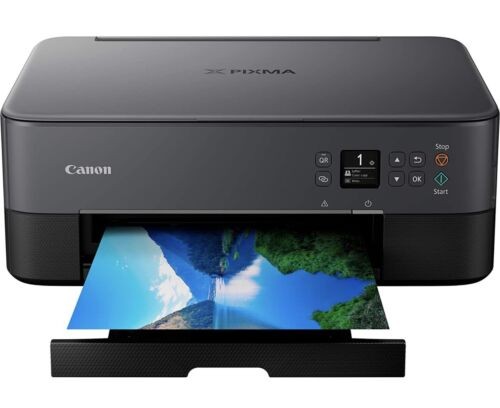
The TS6420a makes the most sense if you want a compact black all-in-one for everyday printing, scanning, and copying, especially if Wireless and Bluetooth connectivity are useful in your setup. Its description also calls out automatic duplex printing, front and rear paper feeding, quiet mode, and support for plain paper, photo paper, envelopes, and more, which gives it a broader everyday-use profile than the title alone suggests. The main limitation is condition: it is listed as Used, so shoppers who specifically want a new-condition printer may prefer the TS3722. Its listed black print speed is 4 ppm, which is also worth noting if faster black document output is a priority.
Canon PIXMA TS3722 Wireless All-In-One Inkjet Printer for Home Office
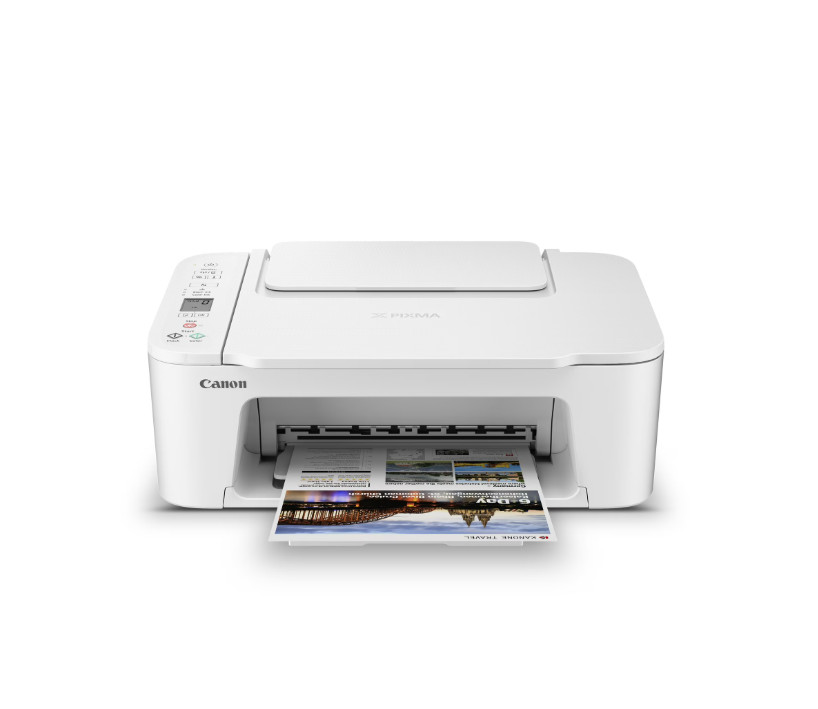
The TS3722 is the cleaner fit for someone who wants a new-condition Canon PIXMA all-in-one aimed directly at home office use. It is described with print, copy, and scan functions, wireless printing from computers or mobile devices, a 1.5-inch LCD screen, a two-cartridge FINE Hybrid ink system, and a plain paper capacity of up to 60 sheets in the rear paper tray. It also highlights media versatility, including photo paper, envelopes, borderless photos, and banners. The tradeoff is that the description states single-sided printing only, so it is less convenient than the TS6420a if automatic two-sided printing is part of your usual document routine.
How to choose between them
If your workspace is mainly for schoolwork, household documents, occasional photos, and simple scanning or copying, either model covers the basic all-in-one idea. Both are Canon PIXMA inkjet printers with 16 Bit color depth, 16 Bit grayscale depth, and a Contact Image Sensor. Both also focus on wireless use rather than a large office-style footprint.
The TS6420a becomes more appealing when the printer will sit in a mixed-device home where Bluetooth may be useful, or where two-sided document printing is a regular convenience. Its description leans into compact placement, quiet mode, multiple paper-feeding options, and everyday home use. That makes it a practical pick for a shared desk or small room where a compact all-in-one is preferred.
The TS3722 is better aligned with a shopper who wants the words "Home Office" right in the product title and a new-condition printer. It also has a more document-and-photo-oriented description, with references to sharp black text, vivid photos, and printing on multiple paper types and sizes. If you print flyers, photos, envelopes, or banners more often than two-sided documents, its media versatility may matter more than duplex printing.
Condition is one of the clearest separators. The TS6420a is listed as Used, which helps explain why it is the lower listed price. The TS3722 is listed as New, and that may be the deciding factor for shoppers who would rather spend slightly more for that condition.
Connectivity is the other obvious split. The TS3722 is listed with Wireless connectivity, while the TS6420a is listed with Wireless and Bluetooth. If you do not need Bluetooth, the TS3722's home office positioning may be enough. If Bluetooth is part of your preferred setup, the TS6420a has the more flexible connectivity line.
Final recommendation
For the most rounded feature fit at the lowest listed price, choose the Canon PIXMA TS6420a Wireless All-In-One Inkjet Printer - Black at USD 39.99. The combination of Wireless and Bluetooth connectivity, scanner and copier features, automatic duplex printing, and compact home-office-oriented design gives it the stronger everyday convenience profile, as long as the Used condition is acceptable.
Choose the Canon PIXMA TS3722 Wireless All-In-One Inkjet Printer for Home Office at USD 41.99 if new condition matters more than the small price difference. It is also the better match if your priority is a home office printer described for wireless printing, scanning, copying, and media variety across photo paper, envelopes, borderless photos, banners, and other paper types.
Because the listed price spread is only about 5% from lowest to highest, the better buy is not simply the cheaper one. Pick the TS6420a for Bluetooth and two-sided printing convenience; pick the TS3722 for new condition and a home-office-focused feature set.